WibuKey Runtime Installation Guide
To use the USB license key with our products, the WibuKey Runtime must be installed. This page will guide you through installing the WibuKey Runtime for Windows.
1. Download the WibuKey Runtime installer
- Go to: Wibu-Systems User Software page
- Download the latest version of the WibuKey Runtime for Windows.
2. Run the installer
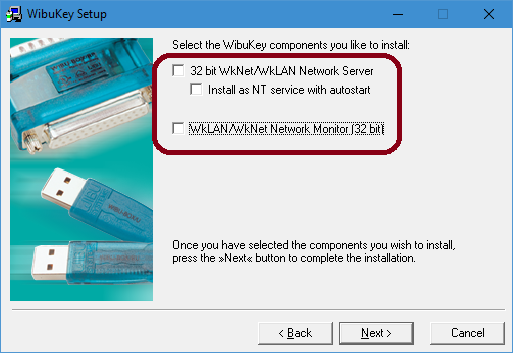
Start the installer and proceed through the steps. If you are using the WibuKey solely with our products, you can uncheck the Server and Network features during installation.
Need Additional Help?
- For redeeming and activating your license key see: https://www.gcimage.com/docs/redeem-license-activation.html.
- For a guided tutorial of the software, see our Quick Start Guide.
- If you need direct assistance, contact us via email at support@gcimage.com